![logo-small-print-color.png]](https://knowledgebase.ratedpower.com/hs-fs/hubfs/logo-small-print-color.png?height=40&name=logo-small-print-color.png)
During a PV plant development, it's very common to identify exclusion zones where no modules can be placed. These zones could be areas such as wetlands, flood plains, trees, high slopes, pipelines, protected areas, and other infrastructures. In this article, we will guide you through the feature "Characterization of Restricted Area", where you will be able to successfully differentiate different types of exclusion zones and later on be able to upload to RatedPower.
Let's take the example of the snip below, where you have the necessary polygons for your site, including the restricted areas such as the high slope, flood plain and wetland.
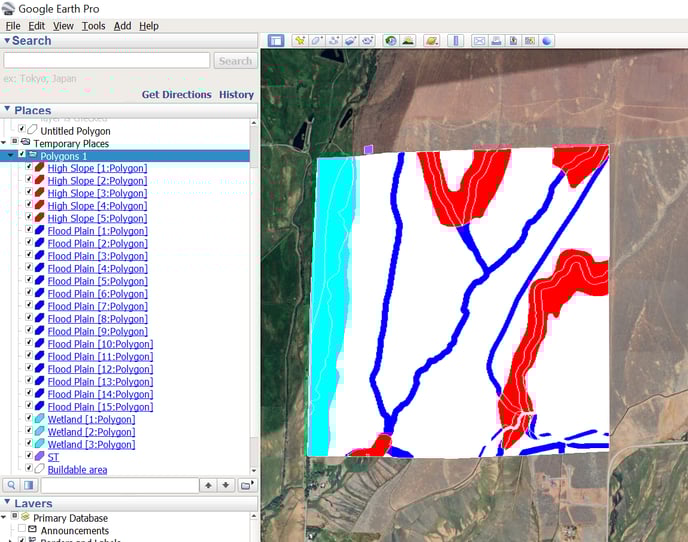
With the "Characterization of RA" feature, you will need to name your restricted areas in one of the following two ways in order to later differentiate them in RatedPower:
- You place them in separate folders named RA, while the element's name inside the folder can remain the same.
-4.png?width=284&height=591&name=image%20(6)-4.png)
- Instead of creating different folders, you simply name the same group of restricted areas with the same "underscore number".
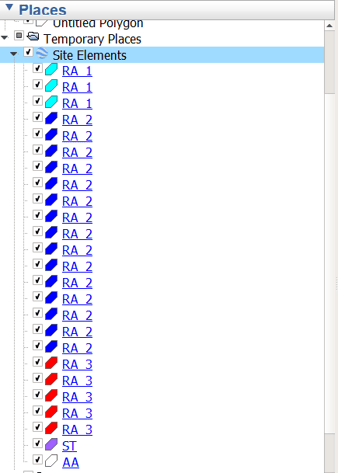
In case you're also wondering how to define the other elements for your site, please refer to this article "How to create a site using Google Earth".
Here is an example of a complete site with different types of Restricted Areas: KMZ Example
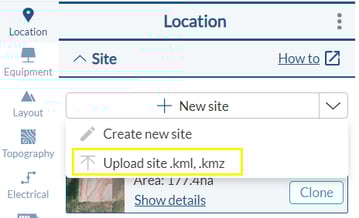
Once you save the KML/KMZ, you will need to upload the site by clicking on "New Site" and "Upload site".
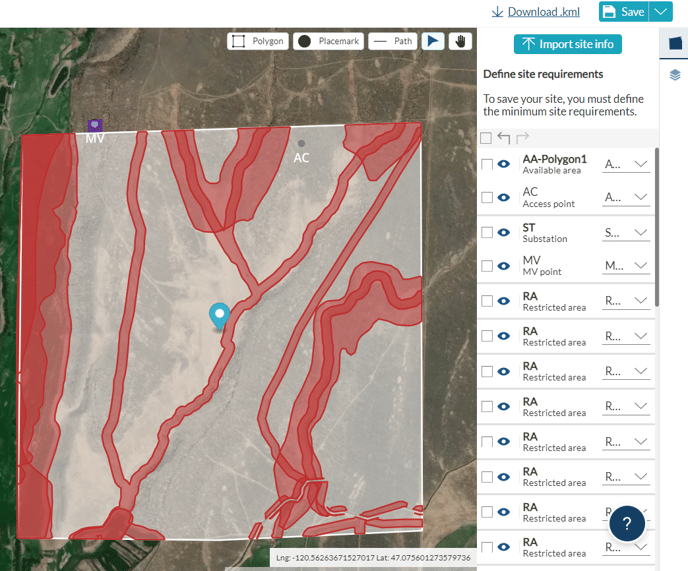
After that, you will be able to apply different setbacks and configurations per each RA type. For more instructions on the next steps please read the article "How to define different strategies for restricted areas".
In case you have to modify your site, please use the past KML/KMZ on Google Earth and re-upload back to RatedPower. With the current version, cloning the site to perform the changes inside the tool will reset the RA types and they will be undifferentiable.
For any other questions or more information regarding this topic, you can contact us at: support@ratedpower.com